Seafloor Roughness
Measure the physical roughness of the seabed in the current HabCam frame — from the stereo imagery itself, independently of the acoustics. It gives you a quantitative texture descriptor to set beside the backscatter, plus a real-height micro-DEM of the patch the camera is looking at.
Open it with the cubes icon on the GroundTruther toolbar; it docks on the right and follows whichever frame the Image Browser is on.
How it works
Roughness is computed server-side. GroundTruther sends only the current
frame's identifier — its Imagename, e.g.
201503.20150619.181140656.204627 — and the service reads the stereo pair from
its own archive, runs stereo matching (RAFT-Stereo on a GPU), and returns the
metrics plus whatever optional rasters you asked for. No image bytes leave your
machine.
Two transports, same request and response:
- Through FastGIS (the normal case) —
POST /seafloor/roughnesswith yourX-API-Key. It reuses the GRASS credentials, so if the GRASS toolbox works, roughness works. - Direct — set
Roughness.direct_urlto POST straight at the GPU service with no auth. Only useful when QGIS is running on the GPU host itself.
Configure both in Settings → Seafloor roughness. If neither the FastGIS credentials nor a direct URL are set, the panel says "roughness service not configured" and does nothing else.
First call is slow
The GPU model loads lazily — expect ~14 s for the first frame of a session and ~0.5 s afterwards. Requests run as background QGIS tasks, so the UI stays responsive, and results are cached per frame so revisiting a frame is instant.
Metrics tab
Press Compute roughness, or tick Auto to recompute every time you browse to a new frame.
| Read-out | What it is |
|---|---|
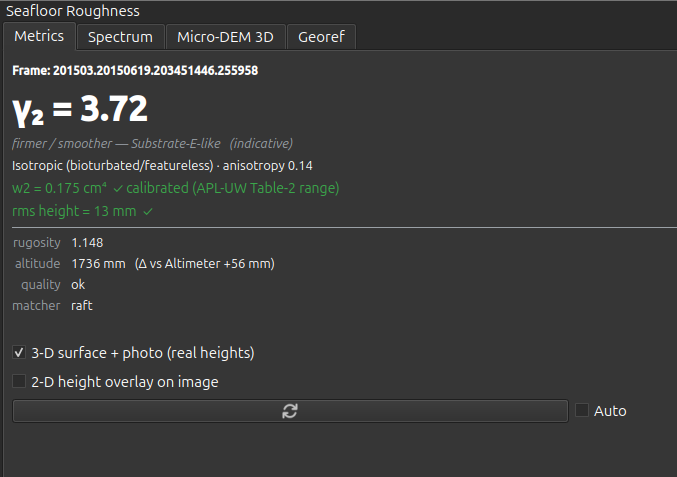
| γ₂ (the big number) | The spectral exponent — the slope of the relief power spectrum. This is the load-bearing output: it describes the texture/fractal character of the surface, it is robust across stereo matchers, and it is the metric this tool adds on top of backscatter. |
| Substrate line | An indicative read off γ₂ and rugosity — "fine / bioturbated", "firmer / smoother", or "intermediate". It is a hint, not a classification. |
| Texture line | Ripples vs bioturbation for this frame, from the spectrum's anisotropy, dominant orientation and wavelength. |
| w2 | Spectral strength, reported in cm⁴ (APL-UW/Jackson convention). Colour-coded per frame by the service's own trust flag. |
| rms height | RMS relief in mm. Same per-frame trust gate as w2. |
| rugosity | Surface-area ratio. |
| altitude | The service's altitude estimate — cross-check it against the frame's Altimeter metadata; they should agree to a few centimetres. |
| quality | ok, insufficient_coverage, or spectrum_fit_failed. |
| matcher | raft, sgbm, or sgbm(fallback). |
Trust γ₂; do not trust w₂'s absolute value
When quality is not ok, every roughness field is null — the panel
shows that rather than fabricating a number.
Even when it is ok, the absolute amplitude of w₂ is not reliable from
current stereo: a RAFT-vs-SGBM comparison found no consistent bias between
matchers. The panel colours w₂ and rms height green only when the service
flags that frame as physically plausible with a clean fit — which is rarely.
Use γ₂, rugosity, anisotropy and relative rms height as your physical
features; do not feed w₂'s absolute value into a physical inversion.
Two checkboxes control how much work the service does — request only what you will actually look at:
- 3-D surface + photo (real heights) — fetches the real-height micro-DEM grid and the co-registered orthophoto, so the Micro-DEM 3D tab can show a photo-textured surface. Slower.
- 2-D height overlay on image — fetches the per-pixel height raster and the rectified-left preview and drapes them on the displayed image. Slower.
Spectrum tab
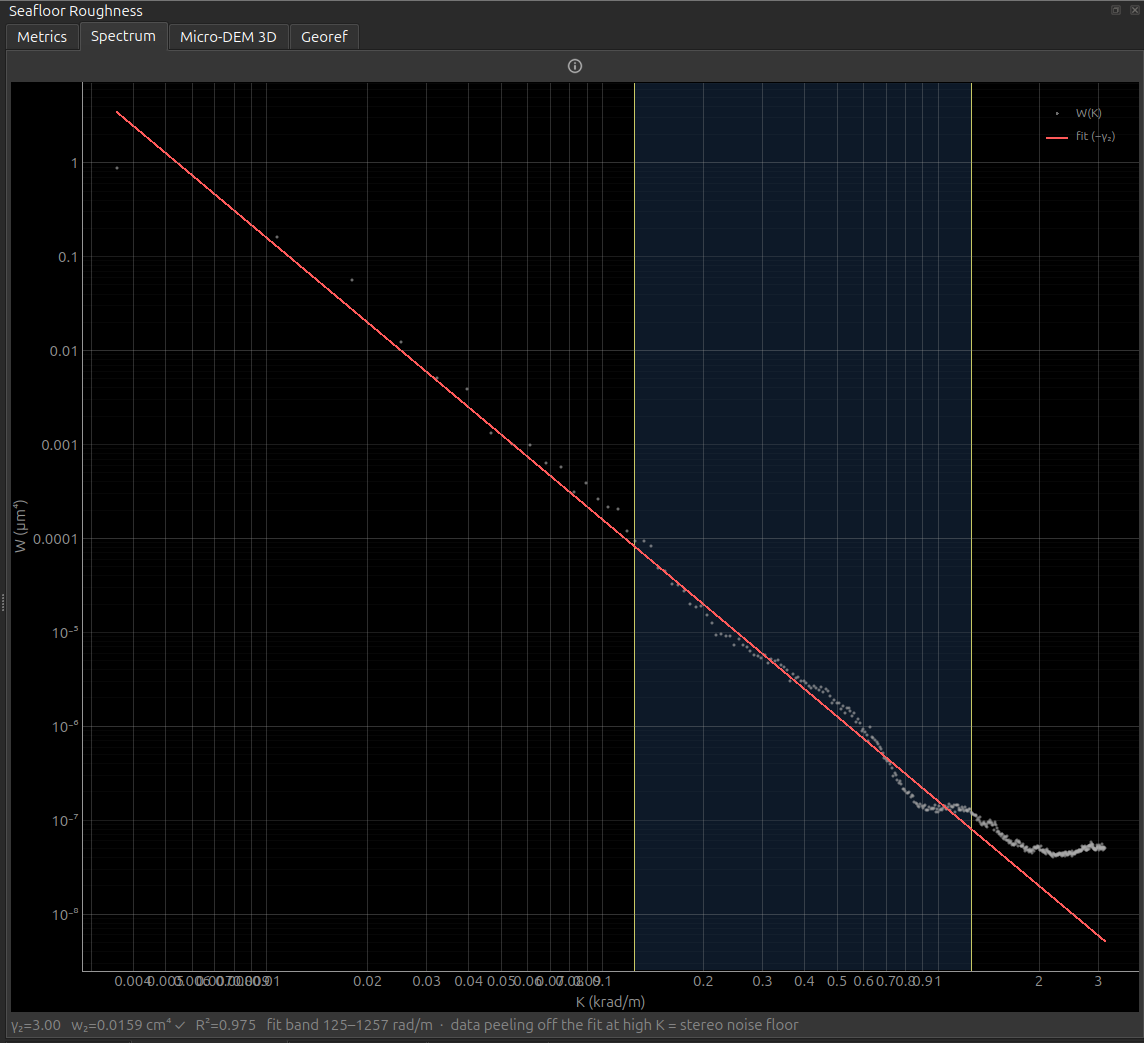
The radial relief power spectrum on log-log axes: W (m⁴) against K (rad/m), with the fitted power law overlaid as a straight line of slope −γ₂, the fit band shaded, and γ₂ / w₂ / R² annotated.
This is the diagnostic that tells you whether to believe the number on the Metrics tab:
- Where the measured curve peels away from the fit line at high K, you are seeing the stereo noise floor, not the seabed.
- A flat or clearly anisotropic spectrum flags ripples — the radial average assumes isotropy, so γ₂ means less there.
The spectrum is always requested; it is a small payload.
The same plot on a different seabed is the quickest way to see what γ₂ is actually responding to. Both of these frames pass the trust gate, and both fit cleanly:
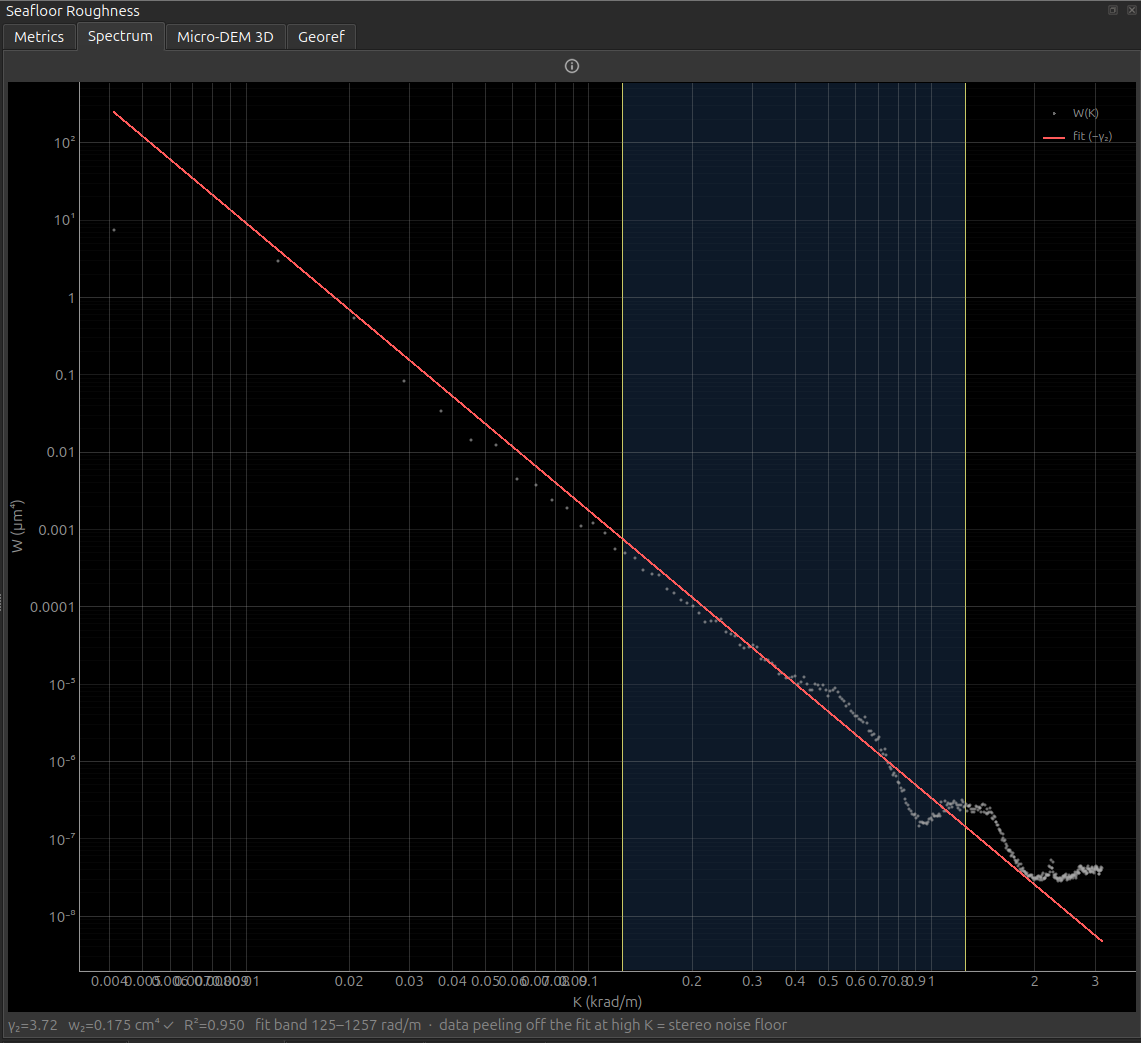
γ₂=3.72 · w₂=0.175 cm⁴ ✓ ·
  R²=0.950 · fit band 125–1257 rad/m
.
Right — image index 6900: γ₂=3.00 · w₂=0.0159 cm⁴ ✓ · R²=0.975.
A shallower slope and eleven times less spectral strength: the second is a
smoother, finer-grained seabed. In both, W (µm⁴) is plotted against K (krad/m) on
log-log axes with the fitted power law in red and the fit band shaded — and in both
the measured curve flattens away from the fit above ~1 krad/m. That tail is the
stereo noise floor, not the seabed.How well does this actually work?
Roughness from this stereo has been tested against an independent label set on the HRS1508 survey — 217 cells of a 25 m grid with single-substrate ground truth, random forest, five-fold cross-validation on 200 m spatial blocks (not random folds, which would leak geography between train and test).
| model | accuracy |
|---|---|
| backscatter angular response alone | 0.659 |
| + γ₂ | 0.691 |
| + γ₂ and rugosity | 0.714 |
| + all roughness features | 0.756 |
The gain of +0.097 has a 95 % confidence interval of 0.039–0.155 and a block-permutation p < 0.001, and γ₂ ranked first of all ten features — above every backscatter descriptor. Minority-class recall went from 0.43 to 0.60. So the headline claim on this page — that γ₂ carries real substrate information that backscatter does not — is measured, not asserted.
Three limits came out of the same work, and they matter when you use this tool:
insufficient_coverage is not a random failure
Frames rejected by the coverage gate are biased by substrate. On HRS1508, 2.7 % of cells over one substrate were rejected against 12.9 % over another — a Fisher odds ratio of 5.3 (p ≈ 2×10⁻²⁵). Turbidity over fine sediment is what drives it. Consequently the frames you successfully measure are not a representative sample of the seabed you flew over, and coverage maps built from roughness will under-represent exactly the softest ground. Report the rejection rate per class, don't just drop the failures.
- w₂ and rms height were excluded from that analysis entirely — not de-weighted, excluded. Amplitude is not recoverable from this stereo, which is the same conclusion the per-frame trust flag reaches one frame at a time.
- Rugosity is amplitude-derived like w₂, yet it ranks third. It is a useful discriminator here; treat it as an empirical feature rather than a calibrated physical quantity.
Per-frame health on a 296-frame line, for comparison with your own data: 2.0 %
rejected (all insufficient_coverage), service altitude agreeing with the
metadata Altimeter to a median 37 mm, and γ₂ median 2.97 (IQR 2.66–3.15).
Micro-DEM 3D tab
The real-height micro-DEM as an interactive 3-D mesh, draped with the orthophoto as a 1:1 texture (one texel per vertex) when the surface outputs were requested. Heights are in millimetres and sit near −altitude, so the mesh is a true representation of the patch under the camera, not a high-passed roughness field.
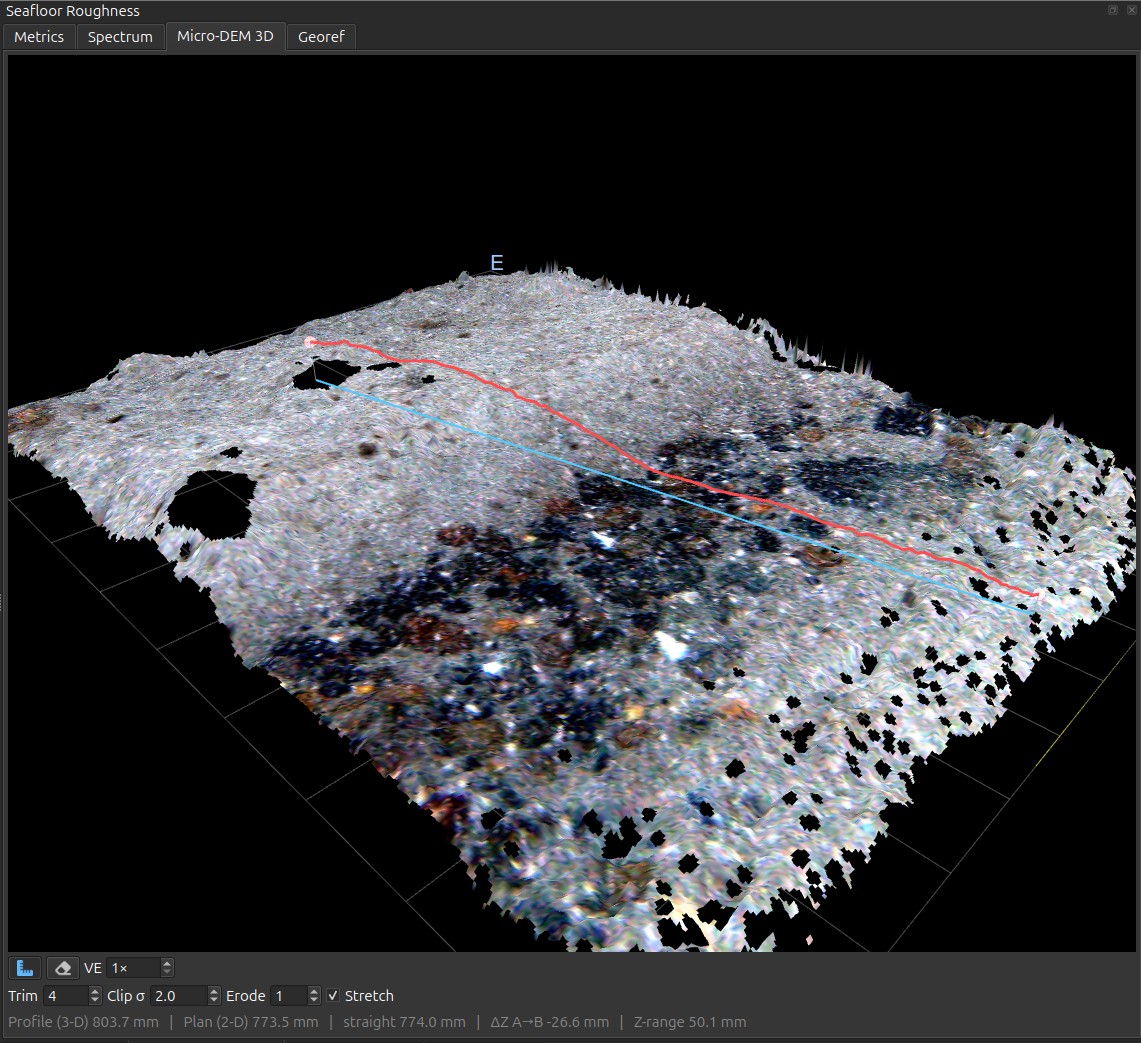
Profile (3-D) 803.7 mm · Plan (2-D) 773.5 mm
  · ΔZ A→B −26.6 mm · Z-range 50.1 mm
— the 3-D distance exceeds the plan
distance by 30 mm, which is the relief. The black patches are no-data cells culled
by Trim 4 / Clip σ 2.0 / Erode 1, not flat seabed, and Stretch is on.
The cell size is the service's choice, not yours
Roughness.res_mm is a request. The service picks the grid spacing per
frame and reports what it used as dx_mm. The nominal default is 1 mm and some
frames do return it, but across one line of the reference dataset 2, 3, 4 and
5 mm all appear. So a micro-DEM's resolution is a property of that frame, not
of your settings: two frames' grids are not necessarily comparable cell-for-cell,
and anything that combines frames has to resample each through its own
geotransform. Read dx_mm rather than assuming.
The stereo DEM is unreliable at the grid border and around no-data holes, which
otherwise shows up as spikes draped in stretched texture. Three live controls
mask them; their starting values come from
Roughness.dem_trim_border / dem_clip_sigma / dem_erode:
- Trim border — drop N outer rings of the grid.
- Clip σ — reject cells more than N robust sigmas from the median height.
- Erode — peel N rings off every no-data / outlier boundary.
Masked cells are flattened to the median and made transparent in the texture.
Georeferencing (Georef tab)
Tick Georeference and GroundTruther attaches the frame's navigation to the request. The service returns a geotransform, and the plugin writes the outputs as GeoTIFFs and adds them to your project:
| Output | Raster |
|---|---|
| Micro-DEM | 1-band Float32, heights in mm, NaN no-data |
| Orthophoto | 3-band RGB |
| Mosaic | 3-band RGB, or 4-band RGBA with Transparent border ticked |
Both land in your survey CRS, so they overlay the bathymetry and backscatter directly.
Check the scale once, with QGIS's own ruler
The quickest confirmation that a mosaic is georeferenced at true scale — not just placed in roughly the right spot — is to measure across it with the QGIS Measure tool and compare against the navigation.
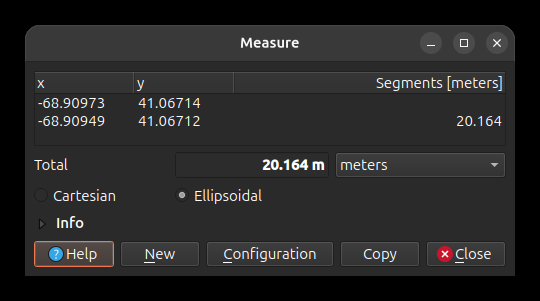
Those two points sit at rows 6873 and 6919; the calibrated USBL fix puts that stretch at 17.7 m along track for a ±15 window and 24.8 m for ±20, so a ~20 m span across the mosaic is the right size. If your measurement comes back a factor off, suspect the altitude or the EPSG before the mount.
QGIS redraws rotated rasters north-up
The geotransform is a rotated affine — the grid is aligned to the vehicle's heading, not to north. QGIS's GDAL provider warps such a raster to north-up for display, which makes it report a larger bounding box and add an alpha band. That is expected: the file on disk and its georeferencing are correct.
The position that is used
Georeferencing uses the calibrated USBL fix — Xutm + dx, Yutm + dy — the
same position as the red map marker and the query builder's sampling centre, so
the raster, the marker and the sample all coincide. It is not the ship GPS and
not the layback model. See
Image metadata → Positioning.
Heading offset vs Mirror
These two controls fix different things and are not interchangeable.
| Control | What it is | Symptom that calls for it |
|---|---|---|
| Heading offset | A continuous rotation in degrees, added to the navigation heading before the server computes the geotransform. | Rasters are consistently rotated relative to the bathymetry — features line up in shape but sit at an angle, and the error is the same angle on every frame. |
| Mirror | A discrete handedness flip — a reflection of the port/starboard axis. | A mosaic comes out port/starboard-flipped: features are mirror images of the real seabed, and successive frames lay down in the wrong lateral order. |
The distinction matters because no rotation can undo a reflection. If the imagery is mirrored, turning the heading offset will move the error around the compass but never remove it — you will chase it forever. Ask: does the picture look rotated, or does it look flipped? Rotated → heading offset. Flipped → Mirror, once.
The mount is known (image bottom→top = heading, image-right = starboard), so the
defaults — offset 0, mirror off — are correct out of the box for the reference
deployment. Treat both as escape hatches.
A saved heading offset near ±180 was resetting a real bug
Until #31 GroundTruther
sent the nav's bearing column as the heading. bearing points astern, so
every georeferenced product came out rotated 180° — and a heading offset of
±180 was the natural way to paper over it.
The derivation is now correct (see
Heading vs bearing),
which means such an offset would double-correct. So the first time you open a
dataset whose calibration was saved before the fix, its heading_offset_deg is
reset to the config default and a line saying so appears in the
GroundTruther message log. epsg, mirror and georeference are untouched.
If you had dialled in a genuine mount fine-tune, set it again and save.
Rasters exported before the fix are rotated 180° and need regenerating.
Saved calibration overrides the config
Why editing Settings appears to do nothing
Save calibration stores georeference, epsg, heading_offset_deg and
mirror in QgsSettings, keyed by a hash of your image-metadata file
path — i.e. per dataset. Once a dataset has a saved calibration, that
wins, and the Roughness.* values in config.yaml are only the fallback
for datasets which have none.
So if you edit those four keys in Settings and see no change, it is because this dataset is already calibrated. Change them on this tab instead.
The other nine Roughness.* keys — service, route, direct URL, resolution,
n-water, DEM size and the three mesh-mitigation knobs — are not part of
the saved calibration and always come from the config.
Changing any of the four re-requests the current frame immediately, so you can see the effect straight away. Clear georef layers removes the rasters this panel added to the project.
Mosaic
The Georef tab also builds a georeferenced mosaic of the frames around the current one: pick a window (± N contiguous frames), a mode, and press Build mosaic. The service pulls the navigation for the window itself and skips frames whose image is missing from its archive.
| Mode | How frames are placed |
|---|---|
| Auto (default) | Chooses per window from the nav-predicted overlap: piled-up frames with plenty of shared content → pixel; well-spread frames → flat. |
| Flat | By navigation alone (position, heading, flat-seabed scale). Fast; best when the nav is accurate. |
| Ortho | Relief-corrected per-frame orthophoto, then nav placement. Slowest. |
| Pixel | Registered by image content, georeferenced through the reference frame's nav. Use when the nav is too coarse and frames pile up. |
Two presets set the rest for you: Browse (3 mm, anti-aliased, fast overview) and Publication (ortho, 0.8 mm, lanczos, 8192 px, RGBA).
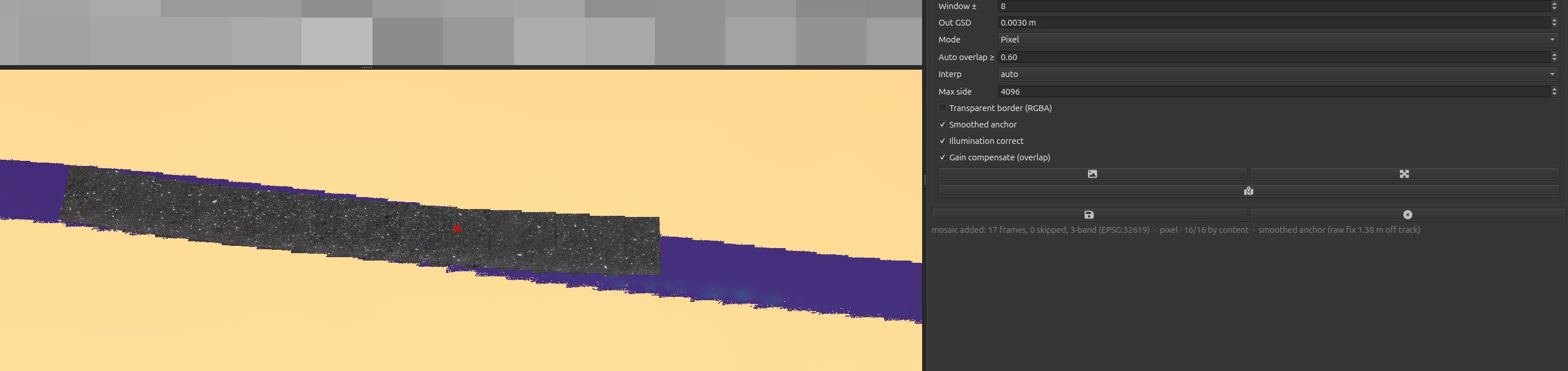
17 frames, 0 skipped, 3-band
  (EPSG:32619) · pixel · 16/16 by content · smoothed anchor (raw fix 1.38 m off
track).The anchor
Smoothed anchor, on by default, is what makes that overlay line up. The USBL is piecewise-constant, so the current frame's raw fix can sit metres off the real track and a mosaic anchored on it inherits that error whole. With the box ticked GroundTruther places the frames on a smoothed USBL track instead, and the status line tells you how large the correction was.
Untick it to get the old behaviour and compare the two on the map — at index 6900 they
land about 1.4 m apart. The setting falls back silently when the metadata carries
no USBL columns or no heading, and the status line says so (service anchor (no usable
nav)) rather than pretending.
The window is capped at ±20: the service refuses more than 41 frames in one
mosaic and returns a bare too many frames (51 > 41) above that.
The mosaic is a picture, not a surface
There is no mosaicked 3-D surface. The mosaic response carries an RGB image and a geotransform — no height band, no DEM — so what you get is a georeferenced photograph of the stretch. The Micro-DEM 3D tab stays per frame: one patch about 1.2 m across, never a composite.
Compositing the micro-DEMs themselves into a continuous height model is what the photogrammetric seabed ribbon does, and it is a script rather than a dock — partly because doing it properly needs frame-to-frame registration and vertical levelling that a per-window mosaic call has no way to solve.
If you overlay both they land within about 0.1 m of each other: the mosaic is sent an explicitly smoothed USBL track rather than anchoring on whichever step the reference frame's raw fix happens to sit on. Where that smoothing is unavailable — no USBL columns, or no heading — the mosaic falls back to the reference frame and the disagreement grows to a median 0.72 m. Measured and explained here.
A mosaic is many frames; the roughness beside it is one
Every number on the Metrics and Spectrum tabs — γ₂, w₂, rms, the fit — comes from the single frame you are on, measured over a patch about 1.2 m across. A ±20 mosaic spans 41 frames and roughly 20 m. They are shown in the same dock and it is easy to read the metrics as describing the mosaic; they do not.
If you want roughness for the mosaicked stretch, compute it frame by frame and aggregate — that is what the HRS1508 analysis does, with a minimum of three frames per 25 m cell.
Content registration is patchy on this imagery — and it is not your frames
In pixel and auto modes the service reports how many frame pairs it actually
registered by content, and GroundTruther shows a banner when that fraction is low
("only 0/10 pairs registered — low texture, mosaic is nav-placed"). On the
reference dataset that banner is common, and where you are matters far more than
you would expect. Measured with mode=pixel, window=±8:
| image index | pairs registered | quality |
|---|---|---|
| 6700 | 0 / 16 | none |
| 6800 | 3 / 16 | low |
| 6900 | 16 / 16 | ok |
| 6920 | 16 / 16 | ok |
| 34941 | 0 / 16 | none |
Those first three rows are the same survey line, 200 frames apart. Part of this is real — featureless mud cannot be content-registered by any method. But part is the matcher: the service registers on CLAHE-enhanced greys, and the ribbon work measured that CLAHE and flat-fielding both lower the inlier count on these dark frames, and that a loose Lowe ratio plus an overlap mask are needed. With that tuning, the strip containing rows 6663–6958 registers at 89.8 % end to end — far better than the service manages on the same frames.
So: a low or none banner is not necessarily a bad patch of seabed. Read the
mosaic as nav-accurate rather than pixel-accurate there, and if you need a
registered example, start at image index 6900 (good from about 6880 to 6958).
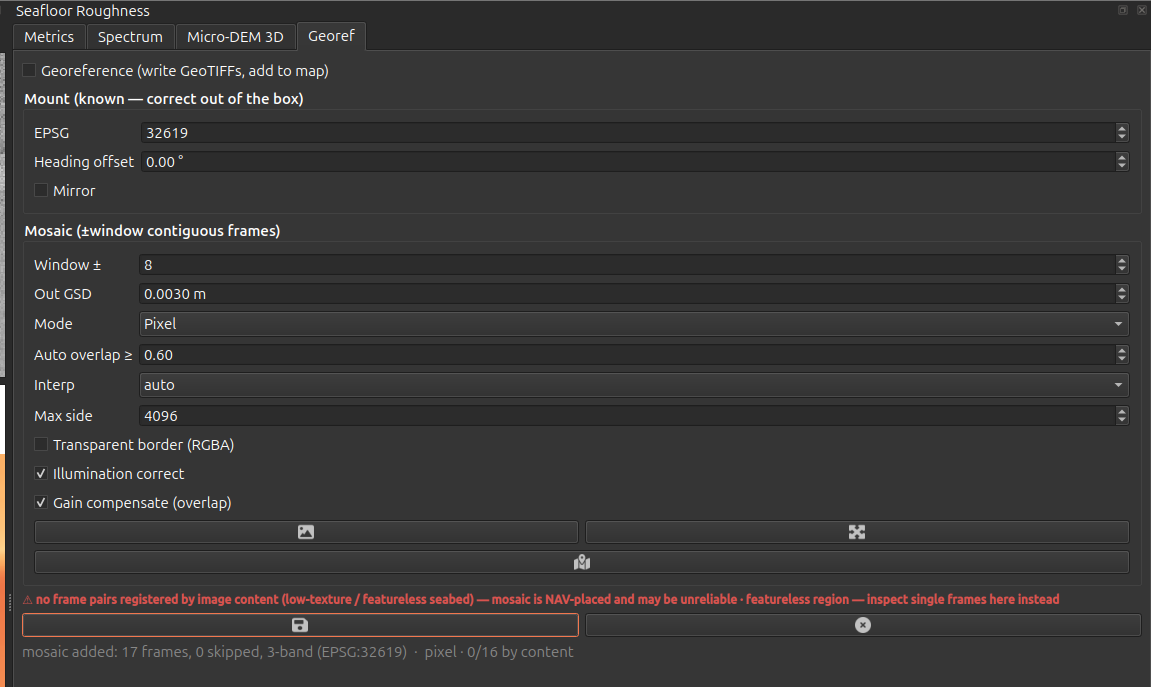
0/16 by content,
so the banner warns it is nav-placed."Featureless seabed" is not a safe reading of that banner
Index 34941 is where the service reports a featureless seabed. It is also the frame on the Metrics tab above — cobbles and shell hash, a micro-DEM full of structure. Running the ribbon's tuned ORB over the same sixteen frames:
| service | ribbon matcher | |
|---|---|---|
| index 34941 | 0 / 16 | 10 / 15 linked, median 37 inliers |
| index 6900 | 16 / 16 | 15 / 15 linked, median 516 inliers |
Two-thirds of those pairs are registrable. 34941 is genuinely harder ground
than 6900 — 37 inliers against 516 — but harder is not featureless. Treat a
none banner as "this matcher did not register it", not as a verdict on the
seabed, and judge the texture by looking at single frames.
Illumination correct (flat-fields the strobe vignette and equalises brightness) and Gain compensate are on by default and are what make a mosaic look continuous. Turn illumination correction off for absolute-radiometry work — it deliberately normalises radiometry.
Settings summary
| Setting | What it is |
|---|---|
Processing.grass_api_endpoint, Processing.grass_api_key |
The credentials roughness reuses. |
Roughness.base_url, Roughness.route, Roughness.direct_url |
Override the transport. Empty = reuse FastGIS. |
Roughness.res_mm, Roughness.n_water, Roughness.dem_max_side |
Compute knobs. Leave the first two unset. |
Roughness.georeference, epsg, heading_offset_deg, mirror |
Georeferencing defaults — overridden by a saved per-dataset calibration. |
Roughness.dem_trim_border, dem_clip_sigma, dem_erode |
Starting values for the 3-D mesh mitigation controls. |
Full descriptions in the settings reference.